
Table of Contents
- What Makes a Photo Ideal for 3D Laser Conversion
- Best Photo Resolution for 3D Crystal Engraving
- 2D vs 3D Crystal Engraving: Key Differences
- Tips for Choosing Group Photos for Crystals
- Lighting, Background, and File Format Checklist
- Common Photo Mistakes That Ruin 3D Engravings
- Frequently Asked Questions
Last Updated: September 23, 2026
What Makes a Photo Ideal for 3D Laser Conversion
The best photo for a 3D crystal engraving has sharp focus, strong contrast, and a clean background. Those three traits give the laser clean edges to work with. According to Crystal Prints' 2026 buying guide, subject definition and resolution are the two most critical factors for avoiding pixelation.

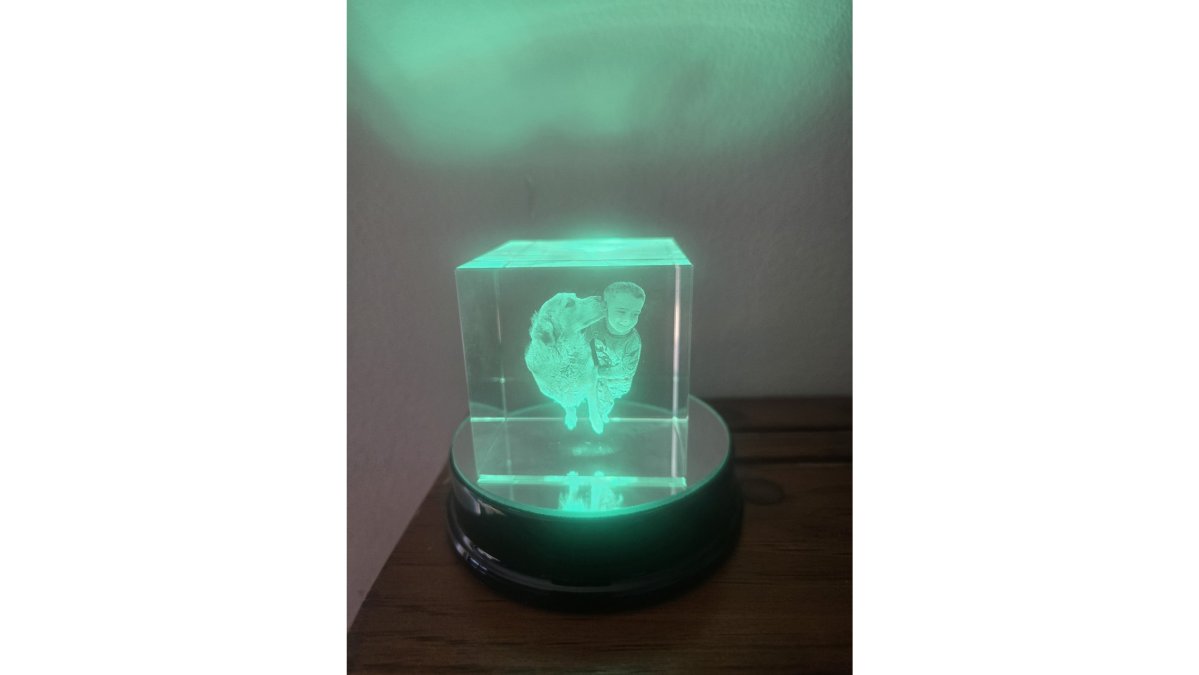
Subject Separation and Depth Perception
Subject separation is how clearly your main subject stands apart from the background. The laser reads brightness levels, so a dark subject against a dark wall turns into a blur.
Aim for:
- A subject that is brighter or darker than the background
- Clear edges around faces, hair, and shoulders
- No busy patterns directly behind the head
Contrast and Shadow Detail in Your Source File
Strong contrast is what stops an engraving from looking like a ghostly blur. According to HomeToSight's 2026 analysis, light-base compatibility and contrast decide whether a crystal reads as a floating photograph or a faint cloud.
Check your file for:
- Retained highlight detail in bright areas
- Visible shadow detail, not crushed black
- Even exposure across every face
Best Photo Resolution for 3D Crystal Engraving
The best photo resolution for 3D crystal engraving is 1 megapixel at minimum, and a 12-megapixel smartphone photo is more than enough (Crystal Prints, 2026). More pixels do not help past that point. What matters is sharpness.
Why Pixel Density Sets the Ceiling on Detail
Inside the crystal, the image is built from thousands of individual laser points, each one a tiny fracture created by a focused beam. The spacing between those points is fixed by the engraving machine's optics, not by your file. Your photo's pixel density decides how much real detail is available to fill that fixed grid.
Smartphone vs. DSLR: What Actually Matters
Most people ordering a 3D crystal are working from a phone, not a dedicated camera. That is fine, modern phone sensors capture more than enough resolution. The failure modes are different, though, and worth knowing before you upload.
Smartphone photos tend to fail on:
- Digital zoom, which crops the sensor and destroys pixel density
- Portrait-mode edge detection, which can blur hair and ears the laser needs to read
- Heavy in-app filters that flatten contrast before the file ever reaches the designer
- Screenshots of photos, which strip the original pixel grid entirely
DSLR and mirrorless photos tend to fail on:
- Shallow depth of field, where only the eyes are sharp and the rest of the face falls off
- RAW files exported at low quality to save space
- Very high ISO, which introduces noise the laser reads as texture
How DPI and Pixel Density Affect Engraving Depth
Pixel density decides how finely the laser can place its points. Low pixel density means the laser has fewer points to work with, so fine details like eyelashes or jewelry disappear.
A quick check before you upload:
- Zoom to 100% and confirm faces are sharp
- Avoid screenshots, which lose pixel density
- Skip photos already cropped hard on social media
2D vs 3D Crystal Engraving: Key Differences
The difference between 2D and 3D crystal engraving comes down to how the laser places its points. 2D engraving burns a flat image onto or just under the surface. 3D engraving builds a point cloud inside the crystal, so the image has real depth.
| Feature | 2D Engraving | 3D Engraving |
|---|---|---|
| Image style | Flat, surface-level | Floating, dimensional |
| Depth perception | None | High |
| Best for | Text, logos, simple art | Portraits, pets, full scenes |
| Photo requirements | Basic clarity | Sharpness and contrast |
| Viewing angle | Front only | Shifts as you move |
Tips for Choosing Group Photos for Crystals
Group photos work well when the subjects are arranged in a tight, even cluster. Industry guidance from 3D Crystal Gift's how-it-works page identifies 1 to 9 people or pets as the optimal range for standard engraving.
Optimal Subject Count and Framing
Frame the group so every face sits at a similar distance from the camera. A person standing far behind the rest will read as smaller and softer inside the crystal.
For wedding parties and bridal groups:
- Keep everyone on one plane, shoulder to shoulder
- Use portrait orientation for tall groups
- Crop out background clutter before uploading
- Avoid harsh shadows across faces
Lighting, Background, and File Format Checklist
Good lighting and a clean background do more for engraving quality than any camera upgrade. Soft, even light keeps shadow detail and highlight retention in balance.
What Post-Processing Can and Cannot Fix
A skilled engraving designer works in software before the file ever reaches the laser. That step can rescue some problems and cannot rescue others.
Usually fixable in post-processing:
- Mild underexposure or overexposure, if detail still exists in the file
- Distracting background clutter, which can be masked or removed
- Minor color casts and white balance issues
- Light blemishes, stray hairs, and small distractions on clothing
- Cropping and reframing to match the crystal shape
Usually not fixable:
- Motion blur or camera shake, the detail is gone, not hidden
- Severe underexposure where shadows are crushed to pure black
- Overexposure where highlights are blown to pure white
- Faces that are out of focus while the background is sharp
- Heavy digital noise from a very high ISO shot
- Faces smaller than roughly a thumbnail in the original frame
Why the Crystal Medium Has Hard Limits
A 3D crystal is not a screen. It is a block of optical glass, and the image inside it is made of tiny internal fractures. That physical reality imposes limits no software can override.
- Viewing angle matters. Because the image is built in layers, some angles read more clearly than others. A profile shot with a strong nose shadow can look dramatic on a phone and muddy in crystal, because the laser reads the shadow as a gap in the subject.
- Contrast is the language. The laser distinguishes subject from background by brightness difference. Two similar mid-tones merge into one shape.
- Depth is compressed. A subject standing far behind the group will read as smaller and softer, because the laser allocates points across a fixed volume.
- Fine detail has a floor. Text below a certain size, thin jewelry chains, and individual eyelashes may not survive the point spacing, no matter how sharp the source file.
The Pre-Upload Checklist
- Subject evenly lit, no harsh side shadows
- Plain background, no busy patterns
- Faces sharp at 100% zoom
- Full-resolution file, not a screenshot
- PNG or high-quality JPEG
- Cropping and aspect ratio match the crystal shape
- No motion blur or camera shake
- Faces large enough in the frame to hold detail
Common Photo Mistakes That Ruin 3D Engravings
Other frequent errors:
- Using a photo where the subject is backlit
- Uploading a compressed social media copy
- Including more than nine subjects
- Choosing a blurry or motion-smeared shot
- Ignoring the crystal shape when framing
At Engraved-N-Time, our 3D Crystal Cube starts at $29 and uses precision 3D laser engraving in crystal-clear optical glass, with an elegant display stand included. Recipients keep these on display: 67% still show their 3D photo crystal more than two years after receiving it, per Beyond Memories' 2026 personalized gifting survey.
Frequently Asked Questions
Does photo resolution matter for 3D crystal engraving?
Yes, resolution directly affects visual clarity. The minimum recommended resolution is 1 megapixel, but a 12-megapixel smartphone photo is considered more than sufficient for high-quality 3D crystal results. Higher resolution preserves fine detail like hair strands and facial features, while low-resolution files produce pixelation that becomes obvious once the image is engraved inside the crystal.
Can you turn a group photo into a 3D crystal?
Group photos work well when they follow specific guidelines. Portraits featuring between 1 and 9 people or pets are identified as the optimal range for standard 3D crystal engraving. Keep everyone on a similar focal plane, avoid heavy shadows across faces, and make sure no one is partially hidden behind another person. Tight crops with clear subject separation produce the best results.
What makes a photo ideal for 3D laser conversion?
Subject definition and resolution are the two most critical factors for avoiding pixelation. Choose images with strong contrast, clean backgrounds, and sharp focus on the main subject. Avoid cluttered backgrounds and flat lighting. A photo with clear separation between the subject and its surroundings gives the laser a cleaner map to convert into a 3D point cloud, which translates to better depth perception in the finished crystal.
How much do 3D crystal photos cost?
Pricing depends on size, shape, and whether a lighted base is included. Engraved-N-Time offers a 3D Crystal Cube with custom photo engraving starting at $29.00, a Crystal Heart with a lighted base at $49.00, and lighthouse designs such as the Portland Head Light at $35.00. Larger cubes and specialty shapes cost more, but the per-unit price stays reasonable for personalized gifts.
Choosing the right photo is the hard part, and it is where most orders go wrong. Engraved-N-Time makes it simple: upload your original file, pick your crystal shape, and our team handles the 3D conversion with precision laser engraving and crystal-clear optical glass. Explore our collection and turn a favorite memory into a keepsake that lasts.